






Accounting App to Create E-Invoices using Salesforce
Learn more!
to accounting app
German companies that generate invoices directly from Salesforce are increasingly asking whether PDF Butler can generate e-invoices.
This is because more and more companies face the challenge of creating e-invoices in ZUGFeRD or XRechnung format—e.g., when working with public-sector customers or to comply with legal requirements in Germany.
We therefore compare three common tools for generating financial documents:
PDF Butler is a popular document generation tool, especially in German-speaking markets, and is often used to create financial documents. Since many companies already use it, they’re asking whether PDF Butler can generate e-invoices. They want to keep using the tool—even though using it for e-invoices comes with certain technical requirements.
And here’s the good news:
✅ Technically, it is possible to create ZUGFeRD invoices with PDF Butler. PDF Butler can generate PDF/A-3 documents and allows you to embed an XML file into the PDF. You can see this in the following video:
Here’s the PDF Butler video that shows how to generate ZUGFeRD invoices with PDF Butler.
The downside:
👎🏼 As far as we know, XRechnung is not supported natively; however, it may be possible to generate XRechnung invoices via extensions and external generators. In addition, creating e-invoices requires technical know-how and configuration.
Conga Composer or Conga Billing offer many options for PDF generation and document automation in Salesforce. Conga is globally established for complex documents and workflows.
The issue:
❌ ZUGFeRD and XRechnung are apparently not supported natively, because creating XML files is not intended. According to official Conga documentation, Conga primarily supports Word, Excel, PowerPoint, HTML, and PDF formats.
Generating XML (e.g., for ZUGFeRD/XRechnung) would likely require significant effort via external workflows and, to the best of our knowledge, is not the standard use case. Unlike PDF Butler, it therefore appears that Conga cannot be used to create e-invoices in the widely used ZUGFeRD format.
Finblick is a modern app embedded directly in Salesforce, built specifically for the finance processes of mid-sized companies.
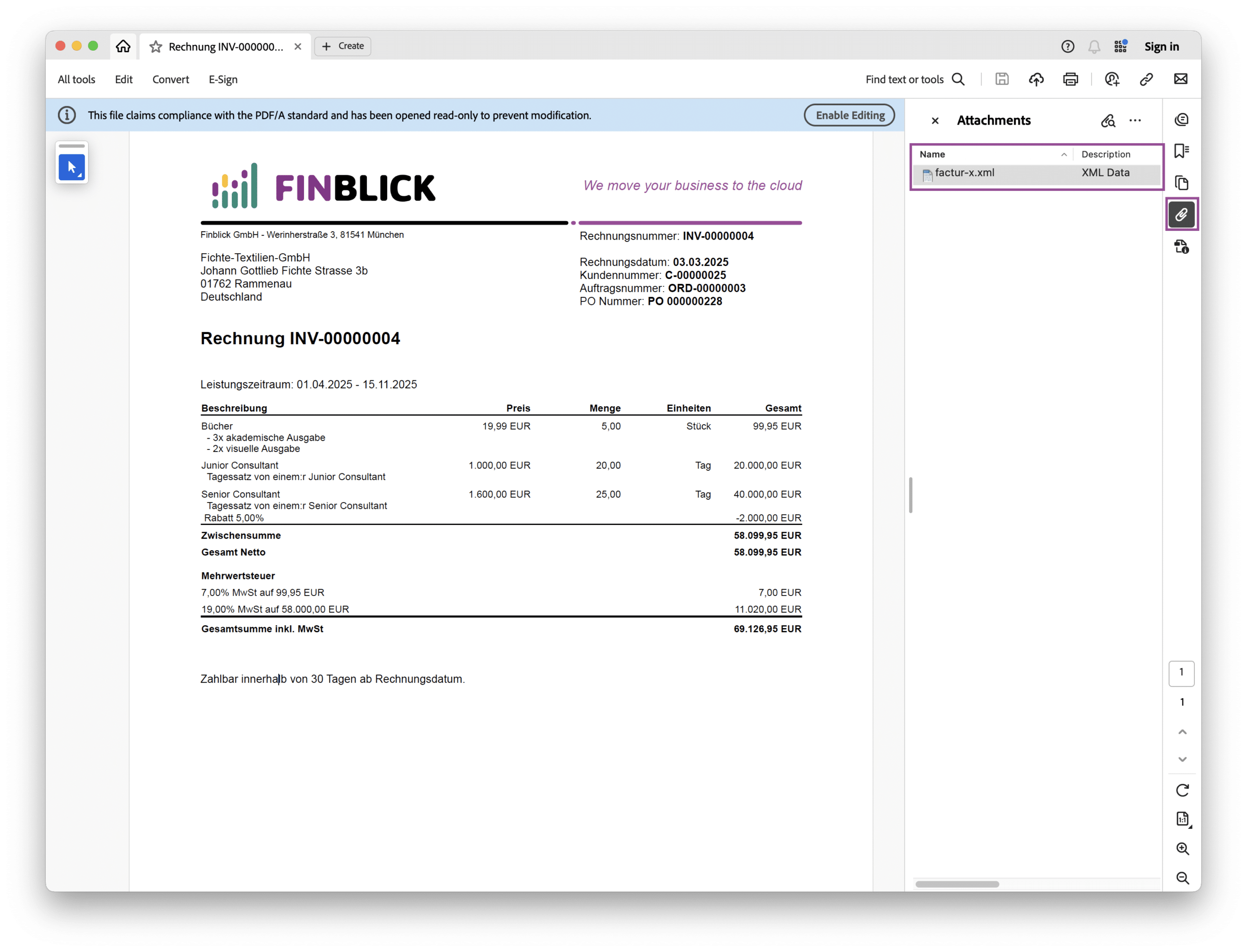
Here’s an example of an e-invoice (ZUGFeRD) created with Finblick, opened in Adobe Acrobat Reader:
| Tool | ZUGFeRD | XRechnung | Notes |
|---|---|---|---|
| PDF Butler | ✅ with setup | ❌ (custom may be possible) | Flexible and established, but technical |
| Conga | ❌ | ❌ | No XML / e-invoice support; standard formats only |
| Finblick | ✅ out of the box | ✅ out of the box | Modern, intuitive, DATEV-ready |
It seems possible to create e-invoices with PDF Butler; with Conga, it is—based on what we know—significantly more complicated. If your company wants to create e-invoices in Salesforce, it’s worth taking a look at Finblick: the app provides an intuitive solution built specifically for the German market.
Here’s a blog post (with video) on how to create e-invoices with Finblick.

Finblick introduces a new feature: global discounts and surcharges directly in Salesforce. It is ideal for SMEs working with ...

In Salesforce, you can create quotes directly from Opportunities — no external tools needed. For many teams, that’s ...

E-invoice, XRechnung (XInvoice)*, XML invoice, PDF invoices, and … ZUGFeRD? E-invoicing is currently a hot topic in Germany. ...
We look forward to hearing from you and will usually reply within one business day!