






Automated Dunning Management in Salesforce
Create and send dunning letters directly in Salesforce — with freely configurable dunning levels, deadlines, and escalation logic. Run reminders fully automated or with manual approval, matched to how your finance team works.
- Freely configurable dunning levels & deadlines
- Automated dunning runs or manual approval
- Optional dunning fees — waivable anytime
- Native Salesforce email delivery
- DATEV export, optionally connected to bank matching



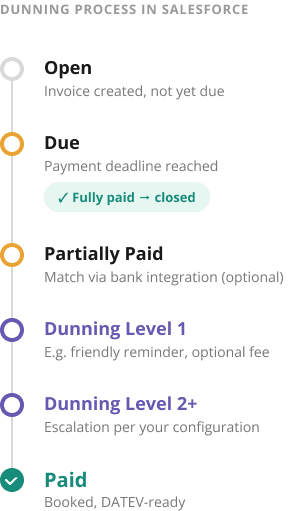

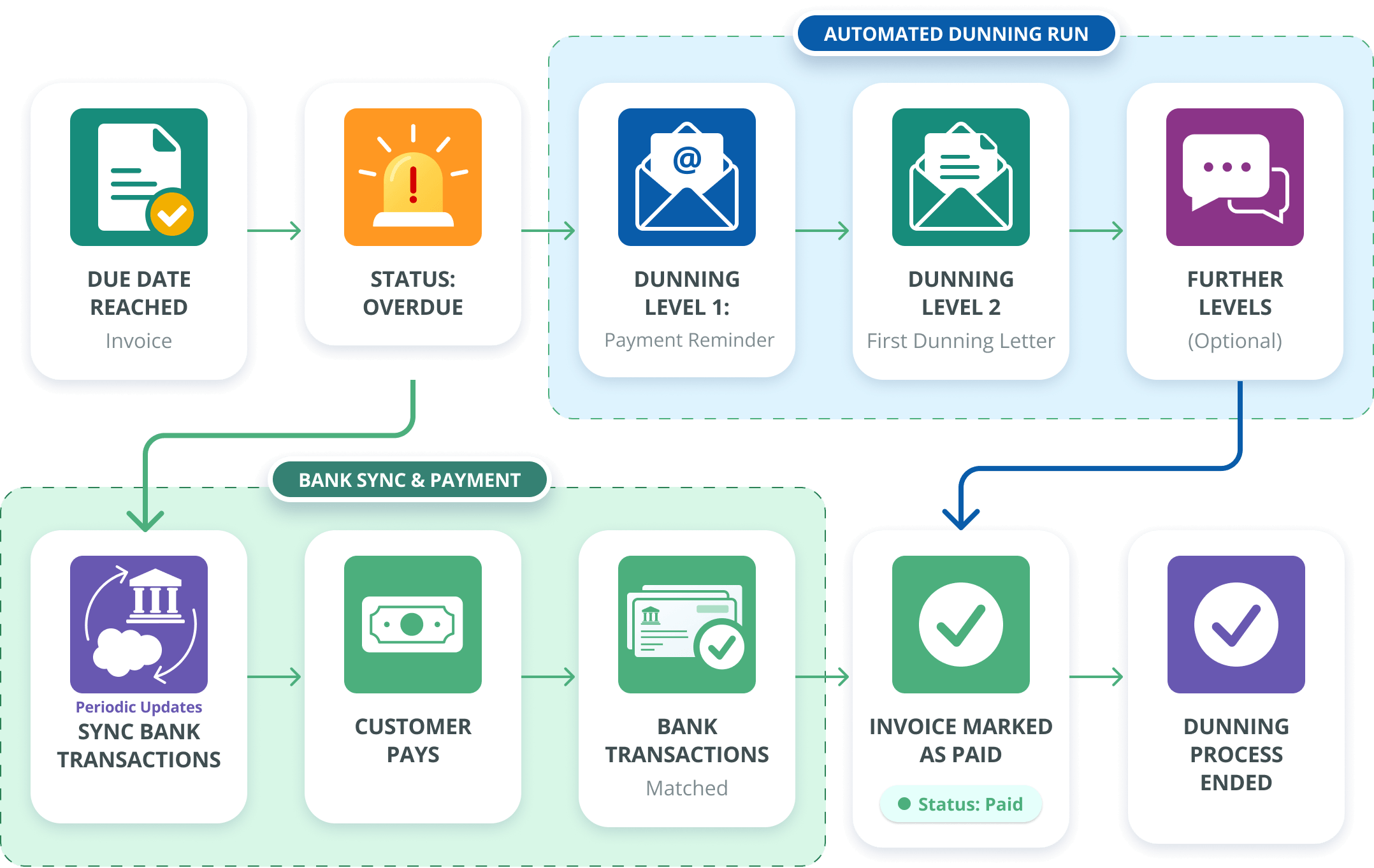
Your Dunning Process, Fully Automated
Once an invoice becomes overdue, Finblick takes over: payment reminders and dunning letters are sent automatically according to your rules. Incoming payments are matched automatically via bank sync – as soon as an invoice is settled, the dunning process ends on its own.
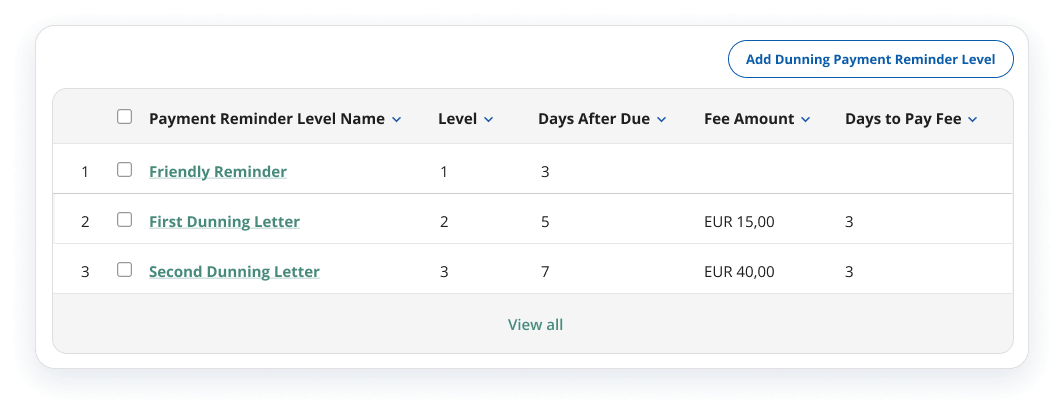
Dunning Levels That Fit Your Process
Configure the number of dunning levels, deadlines, and escalation logic freely — from a friendly first reminder to a final notice. Add a dunning fee at any level, and waive it again whenever needed: the DATEV export reflects the correct booking entries either way. Below is one example of what this could look like. You can configure it however it should be handled in your organization.
FLEXIBLE, TRACEABLE, CONNECTED TO YOUR ACCOUNTING
Dunning Management Features at a Glance
Finblick covers the full dunning process directly in Salesforce — from configurable dunning levels to branded letters and DATEV-ready fee booking.



Automated or Manually Triggered Dunning Runs
Send dunning letters automatically on schedule, or trigger them manually whenever your team decides. How your dunning run works is configured as part of your Finblick setup — fully automated and time-triggered, or released manually — so finance teams choose the level of control that fits their process.
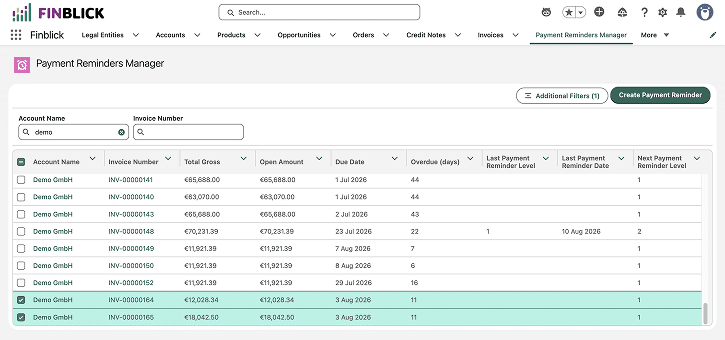

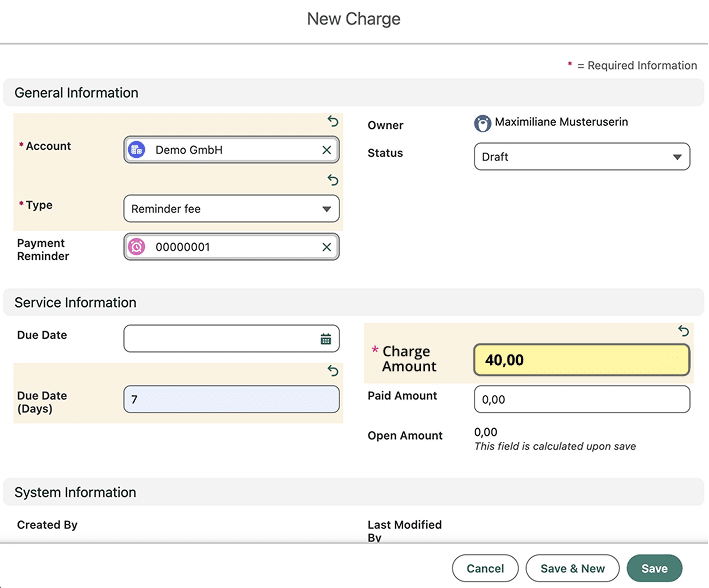
Dunning Fees, Fully Under Your Control
Add a dunning fee per level, and reverse it again whenever necessary. If a fee isn't paid, or you decide to waive it as a gesture of goodwill, the correct booking entries are created automatically for the DATEV export — so your finance team never has to reconcile this by hand.

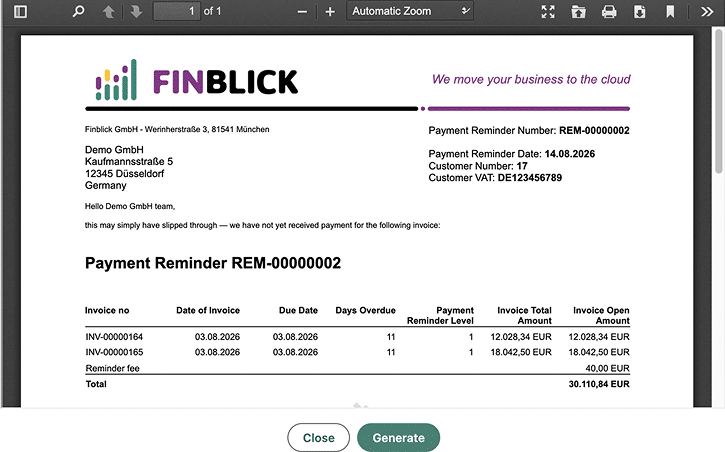
Branded, Multilingual Dunning Letters
Your corporate design applies across all document types — including dunning letters, the same way it does for quotes and invoices. Logo, colors, fonts, and text in multiple languages can be fully customized, and the letter template itself can be individually adjusted — no separate setup required.
Every Dunning Step, Fully Traceable
From the first reminder to the final notice — nothing gets lost between Salesforce and accounting.

Native Email Delivery
Dunning letters are sent directly from Salesforce, with attachments and full activity logging.

Bank Integration
Incoming transactions are synced and pre-matched to open invoices before you dun.

DATEV-Ready
Dunning status and fees transfer to DATEV, including correct entries when fees are waived.

Full Traceability
Every dunning step is logged directly on the invoice record in Salesforce.
Frequently asked questions about Finblick
Key Information About Dunning Management in Salesforce
Here you’ll find answers to common questions about payment reminders and the dunning process in Salesforce. If any question wasn't answered, we're happy to advise you in a brief call.
Can I send dunning letters automatically from Salesforce?
Yes. Finblick lets you configure dunning levels, deadlines, and escalation logic, then run reminders fully automated on schedule or trigger them manually — whichever fits your finance team's process. Dunning letters are sent natively from Salesforce, with the full history logged directly on the invoice record.
Does Salesforce have a dunning management feature for overdue invoices?
Standard Salesforce doesn't include a dedicated dunning module, but Finblick adds full dunning management directly inside your existing Salesforce org: configurable dunning levels, native email delivery for reminders and letters, and DATEV-ready booking for any fees.
Can I automate payment reminders for overdue invoices in Salesforce?
With Finblick: yes. Finblick automatically flags an invoice as overdue once the due date passes and sends payment reminders and dunning letters according to your configured levels and schedule. Incoming payments are matched via bank sync, and the process closes on its own once an invoice is paid.
How do dunning levels and fees work in Finblick?
You define your own number of dunning levels, deadlines, and escalation logic: from a friendly first reminder to a final notice. Each level can include an optional fee, which you can waive anytime; either way, the DATEV export reflects the booking entries automatically.
Does dunning management in Salesforce connect to DATEV and bank transactions?
If you use Finblick: yes. Finblick syncs incoming bank transactions and pre-matches them to open invoices before you dun, and every dunning status and fee (including waived fees) transfers correctly to DATEV. Each step is also logged directly on the invoice record in Salesforce.


Stop Chasing Payments Manually. Automate Dunning Directly in Salesforce.
With Finblick, dunning is just as easy to handle as quotes and invoices — all in one Salesforce app.