





Accounting App to Create E-Invoices using Salesforce
Learn more!
to accounting app
Finblick introduces a new feature: global discounts and surcharges directly in Salesforce. It is ideal for SMEs working with different document types while relying on clear, reliable processes.
Anyone who works daily with quotes, order confirmations, and invoices knows the challenge: discounts and surcharges must be applied quickly, calculated accurately, and transmitted correctly. That is exactly why we have developed a new feature in our accounting software for Salesforce, Finblick: Global discounts and surcharges for all relevant financial documents.
The feature combines three elements that are essential in everyday business:
A global discount or surcharge in Salesforce is applied once at document level to the entire document. This eliminates the need to manually adjust or distribute values across individual line items. It is particularly useful when:
The feature supports both percentage-based and fixed-amount discounts and surcharges in Salesforce.
Finblick consistently applies global discounts and surcharges to:
This ensures consistency in communication and reduces potential accounting errors.
A common issue with discounts is unclear presentation. Finblick takes a different approach. The global adjustment is displayed transparently within the document (see screenshot below). At a glance, you can see:
This keeps the transaction fully transparent – for your team and for your customers.
The interface is intentionally intuitive. Input is fast, values remain transparent, and the impact is visible immediately. This not only simplifies daily work but also reduces follow-up questions and correction loops.
The following screenshot shows a Salesforce environment with a global new customer discount and an onsite surcharge:
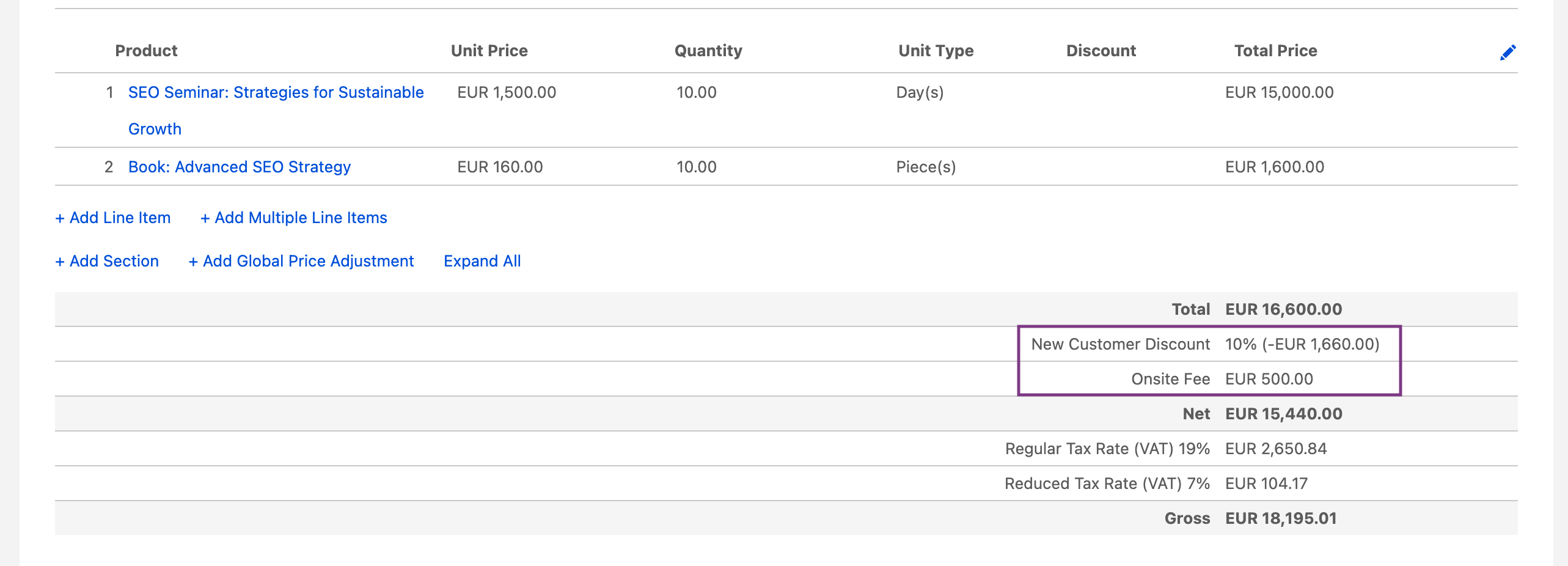
This screenshot, in turn, shows how easily global adjustments – whether a discount or a surcharge – can be added:

Especially for SMEs, it is crucial that discounts and surcharges are not only correct in the PDF but also properly transferred into standardized formats. Finblick ensures that global discounts and surcharges are accurately transmitted in XRechnung and ZUGFeRD.
Learn more about how easy it is to create e-invoices (ZUGFeRD & XRechnung) in Salesforce here:
Blog post: E-invoices from Salesforce
In addition, all information remains fully intact when exporting to DATEV.
This saves time, prevents accounting queries, and ensures compliance in digital invoice exchange.
SMEs need processes that work reliably – without requiring specialist knowledge or additional effort. The global discounts and surcharges in Salesforce enabled by Finblick support exactly that:
All within a user experience that integrates seamlessly into your existing workflow.
With its new global discounts and surcharges feature, Finblick delivers real practical value: fast to apply, clearly presented, and fully export-compliant – ideal for SMEs working with multiple document types while maintaining simple and reliable processes.
Here you will find answers to frequently asked questions about global discounts and surcharges in Salesforce. If you have any further questions, feel free to contact us via our contact form.
With a suitable solution like Finblick, a global discount can be applied directly at document level – either as a percentage or as a fixed amount. The discount is automatically calculated on the total amount and transparently displayed in the document. The calculation remains consistent and exportable. In the screenshots above, you can see what this looks like in Finblick and how to add global adjustments. A global surcharge works in exactly the same way.
The same applies to quotes: with Finblick, a global discount can be defined centrally without modifying individual line items. The reduction is automatically applied to the total price and clearly presented. This ensures that the pricing logic remains transparent and consistent throughout the entire process. Again, the screenshots above show what this looks like, and a global surcharge can be added just as intuitively.

Not every tool can handle every invoice type: these are the questions you should clarify before switching to a new tool for ...

Want to create ZUGFeRD invoices in Salesforce – directly, without extra tools or manual exports? With Finblick, this takes ...

With the Finblick AI Agent for Quoting, you can create a complete quote from your meeting notes with a single prompt – ...
We look forward to hearing from you and will usually reply within one business day!